This is a simple project that tries to use the Raspberry Pi as a Scoreboard.. on a character LCD
What we will do in this project is write a python script that will use httplib and rplcd to connect to the internet and display the score..
if you are not aware of Raspberry Pi or the Python programming language, there are plenty of resources on-line. I personally learned python from the python monk and learnpython
It is a matter of a few hours before you are well versed in both.
I was making a Cricket scoreboard as part of the Google Hackathon, you can use the same method to do many other tasks, from facebook notifications to tweeter.
make sure that your RPi has a running OS and is connected to the INTERNET. refer to my 1 minute RPi setup blog post for instructions on the same
The Score:
First of all i needed a web API provider who does it for free. (not easy to find). google helped me here and i was lucky..
I found this somewhat immature API that gives out some basic scores at [embed]http://cricscore-api.appspot.com/[/embed]
please bear in mind that this was my first python program so i was happy that it worked, there may be some mistakes but it worked.
the way this works is I create a connection to the website and read the response.


Happy hacking.
What we will do in this project is write a python script that will use httplib and rplcd to connect to the internet and display the score..
if you are not aware of Raspberry Pi or the Python programming language, there are plenty of resources on-line. I personally learned python from the python monk and learnpython
It is a matter of a few hours before you are well versed in both.
I was making a Cricket scoreboard as part of the Google Hackathon, you can use the same method to do many other tasks, from facebook notifications to tweeter.
make sure that your RPi has a running OS and is connected to the INTERNET. refer to my 1 minute RPi setup blog post for instructions on the same
The Score:
First of all i needed a web API provider who does it for free. (not easy to find). google helped me here and i was lucky..
I found this somewhat immature API that gives out some basic scores at [embed]http://cricscore-api.appspot.com/[/embed]
please bear in mind that this was my first python program so i was happy that it worked, there may be some mistakes but it worked.
the way this works is I create a connection to the website and read the response.
Con = httplib.HTTPConnection('cricscore-api.appspot.com')
Con.request("GET", "/csa")
Response = Con.getresponse()
return eval(Response.read()) ## Disputed
and
once the score was recorded i decode it according to the format that
the API provided the result in. Now this part is highly API specific and
would vary from API to API, so i do not think that it will be a great
idea to go through that mess, as you would end up doing that all over
again for your set of API.
Just remember that you have recorded the response and would have to act on it accordingly.
In
my case i had to get the Match ID for my favorite teams, and then get
the score string in the type i required (detailed or short) and then
display it on to the LCD "periodically".
The LCD:
for using the LCD i used he RPLCD library.. its available on GITHUB [embed]https://github.com/dbrgn/RPLCD[/embed]
you can clone this library, follow the README and install it using pip. (comment if facing any difficulties)
This command has to be run on your RPi, if you are facing difficulties connecting to your RPI , have a look at my 1 minute RPi setup blog post, that would seriously help.
sudo pip install RPLCD
as for the connections of the character LCD on the Pi this is the schematic..
connect
the Vcc, Ground and other connections to the 5v and ground pins that
are available on the GPIO. use the 3.3 v pin for connecting the LED
pins. as you can see you are not out of pins here.
Setting up the layout of the display is finally your choice.
for a start you can use my script.
change the Favorite Teams list and add your cricket team , if there is a match on a particular day, it will show up.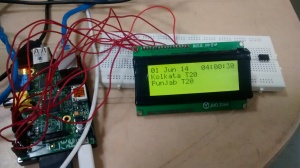

if you look at the display i have added Date and time display too.
here is the script (I would seriously advice against copying it from here, use the link)
# Python script to display the latest scores
# Arun Kumar @ArunMKumar
# Varun Gupta varun90gupta@gmail.com
# Anish Tambe @atdaemon
# 01.06.2014
######################## Libraries ##############################
from __future__ import print_function, division, absolute_import, unicode_literals
from RPLCD import *
import httplib
import time
import re
####################### Constatnts #############################
teams = ["England", "India", "Sri Lanka", "West Indies", "Punjab T", "Chennai T", "Yorkshire", "Hampshire", "Surrey", "Sussex" ]
rows = {"time" : 0 , "team1" : 1 , "team2" : 2 , "player" : 3}
colm = {"teamname": 0 ,"score": 12, "time": 11}
namelen = 7
###################### functions ##############################
display = None
def initLCD():
global display
display =CharLCD()
display.clear()
display.cursor_mode = CursorMode.blink
def getMatchList():
Con = httplib.HTTPConnection('cricscore-api.appspot.com')
Con.request("GET", "/csa")
Response = Con.getresponse()
return eval(Response.read()) ## Disputed
def getFavsIds(matchesList,favTeams) :
favs = []
for match in matchesList :
if match['t1'] in favTeams or match['t2'] in favTeams :
favs.append(match['id'])
return favs
def getMatchScore(matchId):
Con = httplib.HTTPConnection('cricscore-api.appspot.com')
Con.request("GET", "/csa?id="+"+".join(map(str,matchId)))
Response = Con.getresponse()
return eval(Response.read()) ## Disputed
def getTeamNameandScores(status):
Result = re.search("([a-zA-Z\ ]+).*([0-9]+\/[0-9]+)*[\ \*]*v([a-zA-Z\ ]+).*([0-9]+\/[0-9]+)*",status)
names = [Result.group(1), Result.group(2), Result.group(3), Result.group(4)]
return names
def displaytime():
global display
display.cursor_pos = (0,0)
Current_Time =time.strftime("%d %b %y")
display.write_string(Current_Time)
display.cursor_pos = (rows['time'], colm['time'])
Current_Time = time.strftime(" %H:%M:%S")
display.write_string(Current_Time)
###############################################################################
initLCD()
#Get list of matches
matches = getMatchList()
#Get the Match ID
matchIds = getFavsIds(matches, teams)
#get the status for all matches
statuses = getMatchScore(matchIds) # all scores
print(statuses)
# Display Scores
for status in statuses:
nameAndScore = getTeamNameandScores(status['si'])
display.clear()
displaytime()
if nameAndScore[0]:
display.cursor_pos = (rows["team1"],colm['teamname'])
display.write_string(nameAndScore[0].strip()[:namelen])
if nameAndScore[1]:
display.cursor_pos = (rows["team1"],colm['score'])
display.write_string(nameAndScore[1].strip())
if nameAndScore[2]:
display.cursor_pos = (rows["team2"],colm['teamname'])
display.write_string(nameAndScore[2].strip()[:namelen])
if nameAndScore[3]:
display.cursor_pos = (rows["team2"],colm['score'])
display.write_string(nameAndScore[3].strip())
time.sleep(60/len(matchIds)) # sleep accordingly


Hello nice blog im from newcastel i found this on yahoouk I seen it on the top ten searches i found this blog very interesting good luck with it i will return to this blog soon
ReplyDeleteelectronic display boards india
Tableau Classes Online
ReplyDeleteTableau classes online are a convenient way to learn visualization tools. This tableau classes details gives a good overview. It includes practical sessions. Learning looks interactive. Helpful resource.
Salesforce Development Course
ReplyDeleteSalesforce development course is great for developers. I found this salesforce development course. Looks detailed. Covers coding basics. Good option.
Great insights! A devops online training
ReplyDeletehelps streamline development and operations through automation and collaboration, leading to faster and more reliable software delivery.
MuleSoft certification training seems like a great way to validate skills. This post explains it well.mulesoft certification training
ReplyDeletemulesoft developer training is explained well with focus on real-time skills.
ReplyDeletemulesoft developer training
A ServiceNow course provides a strong foundation in IT service management. It helps learners understand workflows and automation.servicenow training
ReplyDeleteServiceNow training is a great career choice today. Thanks for the detailed insights.servicenow training
ReplyDeleteExcellent article! Learn dell boomi training cost
ReplyDeletethrough our hands-on course, mastering cloud integration, workflow automation, and real-world data management projects for career growth.
I’ve been researching ServiceNow admin courses, and they appear very useful for learning workflows and automation. Definitely worth considering.service now admin course
ReplyDeleteGreat insights! Our dell boomi online training
ReplyDeleteequips you with in-demand cloud integration skills for faster career advancement.
This Salesforce CPQ training course provides hands-on knowledge to manage complex pricing and quoting systems.salesforce cpq training course
ReplyDeleteA great resource to learn Salesforce CPQ from scratch.learn salesforce cpq
ReplyDeleteOnline Salesforce CPQ training offers flexibility with real-time use cases.
ReplyDeletelearn salesforce cpq
salesforce cpq training course – Salesforce CPQ training course is well-structured and useful for building strong CRM and CPQ knowledge.salesforce cpq training course
ReplyDeleteMuleSoft developer training is essential, and this content provides good insights.Mulesoft developer course online
ReplyDeleteTableau Classes Online
ReplyDeleteDo Tableau classes online usually include real datasets for practice? I noticed this tableau classes online. Curious to know.
Structured admin training that helps learners manage ServiceNow systems, workflows, and operational tasks efficiently.service now admin course
ReplyDelete